py-slowdown
Play music slower or faster without changing its pitch, on the desktop and on Android
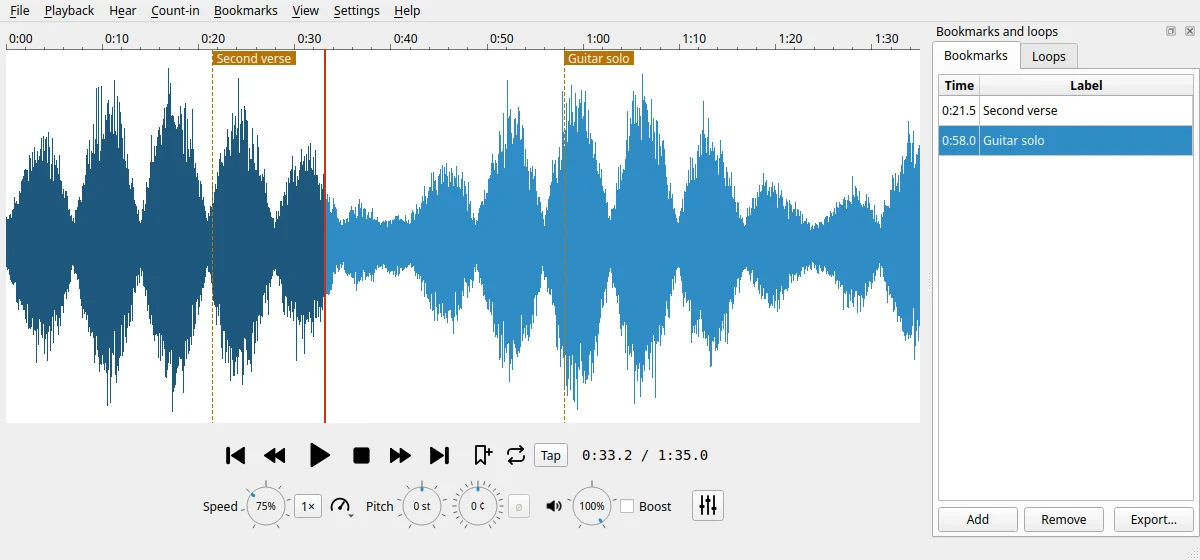
py-slowdown plays audio slower or faster without changing its pitch. It is made for music: for practising a piece and learning it by ear, hearing a passage again and again at a speed one can follow. The file is shown as a waveform, the usual player controls move through it, and bookmarks keep the places one wants to come back to. What it does besides playing, such as the count-in, the tempo or the pitch in semitones, is meant for musicians; it is not a tool for transcribing speech. It runs on Linux, Windows and macOS, and Slowdown, its Android version, does most of the same on a phone.
- Version
- 1.4.0 (25 November 2026); Slowdown for Android 1.1 (25 November 2026)
- Programs
- a window for Linux, Windows and macOS; an app for Android
- Engine
- the Rubber Band Library, with its R3 engine, the one of highest quality
- Interface
- English and Spanish
- Needs
- nothing else, with the installers and packages (they bring their own Python, Qt, FFmpeg and Rubber Band); from the source, Python 3.14 or later and the Rubber Band Library; on a phone, Android 12 or later on a 64-bit ARM device
- Licence
- GNU General Public License, version 3 or later
- Code
- py-slowdown on Codeberg and GitHub; Slowdown for Android on Codeberg and GitHub
What it does
It opens audio files and the sound of video files: MP3, M4A, MP4, FLAC, WAV, AIFF, Ogg, Opus, WMA and whatever else FFmpeg reads. The file appears as a waveform with a time ruler, where a click moves the position and the wheel scrolls and zooms; a long file can be played while it is still being read, and the second time its whole waveform is there at once.
The speed goes from 0.25× to 3× and can be changed while it plays, on a knob or from a list of speeds of one’s own (50%, 75%, 100%…). The stretching is done by the Rubber Band Library, with its R3 engine, called through a small binding of py-slowdown’s own; at 1× the file is played as it is, sample for sample, without going through Rubber Band. A lighter quality, which needs half the processor, or the older R2 engine, with crisper attacks, can be chosen instead. The pitch moves up or down on two knobs, in semitones (−12 to +12) and in cents (−50 to +50, to tune a recording to an instrument), without changing the speed, and a voice or an instrument can keep its formants, and so its timbre.
A pause takes the position back to where playing started, so that Space plays the same passage again. A selection repeats without end and without a gap, the end of the passage running into its start through a short fade, at any speed, and selections can be kept as loops with a name. Bookmarks, each with a label, are added at the playing position or anywhere on the waveform, listed in a side panel and exported as text.
For working on a piece it has a few more tools:
- Hear plays one part of the mix: one channel, the two in one, the mix without its centre (where the voice and the solo usually are), only the bass, or everything but the bass. A five-band equalizer, from 60 Hz to 12 kHz, raises or lowers each band on its own knob.
- Count-in gives a metronome’s clicks before playing. Their tempo can follow the speed, and can be measured by tapping with the beat. With the recording’s first beat marked, the recording comes in on the nearest beat wherever playing starts.
- Export the audio saves the recording, or the selection, as it sounds (at the speed and pitch chosen, and as it is heard, if asked), as WAV, FLAC, MP3 or Opus.
For each file it remembers its bookmarks, its loops, the point where it was left and how it was played, and goes on from there the next time. All that is also written in a file with the recording’s name and the extension .slx, beside it or in a folder chosen, so that it travels with the recording; opening the .slx opens the recording. Everything can be done from the keyboard, and the keys can be changed, also for a foot pedal that sends keys.
On Android
Slowdown for Android (version 1.1) is the same program for a phone. It has the same engine, reads and writes the same .slx files, and its window is laid out and coloured like that of py-slowdown: the waveform, the player’s buttons, the knobs of the speed, the volume and the pitch, and the panel of the bookmarks and the loops. A tap on the waveform moves the position, dragging scrolls, and pinching zooms around the fingers. It changes the speed and the pitch as the desktop program does, repeats a selection or the whole file without a gap, keeps loops and bookmarks with names, and remembers how each file was played. MP3, FLAC, WAV and AIFF are decoded by the app itself, a five-minute song in half a second; other formats by the codecs of Android, more slowly. A keyboard or a foot pedal works with the keys of py-slowdown, and the play button of headphones plays and pauses.
The count-in, the ways of hearing, exporting the audio and playing with the screen off are not in the app yet. It is written in Kotlin, with the sound engine in C++, and needs Android 12 or later on a 64-bit ARM device. It can be installed from its releases (Codeberg, GitHub), with Obtainium, or from my own F-Droid repository, nivaca.codeberg.page/fdroid; all three use the same signed APK, so any one of them updates the others.
Installing it
Every release is signed, and is on Codeberg and GitHub. The installers carry all the program needs, so nothing else has to be installed.
| System | How |
|---|---|
| Windows 10 or later | an installer (.exe), for one user or for everyone |
| macOS 13 or later | a disk image (.dmg), for Apple silicon or Intel |
| Fedora | sudo dnf copr enable nivaca/py-slowdown, then sudo dnf install py-slowdown |
| Debian 12, Ubuntu 22.04 and later | the .deb of a release, or my signed APT repository, github.com/nivaca/apt |
| Any Linux | an installer (.run), or an AppImage, which needs no installing |
| Android 12 or later | the app, from its releases, Obtainium or F-Droid (see above) |
| From the source | Python 3.14 or later and the Rubber Band Library: uv run py-slowdown, or install/install.sh on Linux and macOS |
The installers for Windows and macOS are not signed by Microsoft or Apple, so the first time the system asks whether to open them; the README says how.
Documentation
- The user manual, in PDF: English, Spanish;
man py-slowdownonce the RPM or the Debian package is installed. - The README, with everything at length, the keyboard shortcuts and where each thing is kept: English, Spanish; that of the Android app: English, Spanish.
- How py-slowdown was made, and the changelogs of py-slowdown and of the Android app.
Versions
The main steps, from the first version to the present one. The changelog has every version.
- 0.1.0
24 Nov. 2026The first version: the waveform, the usual controls, the speed from 0.25× to 3× by Rubber Band, bookmarks, an interface in English and Spanish; a signed RPM, an AppImage and a Debian package. - 0.2.0Installers for Windows, macOS and any Linux; repeating a selection without a gap; the count-in.
- 1.0.0The first stable version: the pitch in semitones; tapping the tempo; the recording's first beat; reopening the last file.
- 1.1.0Exporting the audio; hearing one part of the mix; keeping the formants; loops; keyboard shortcuts of one's own; each file as it was played; files read several times faster.
- 1.2.0The settings of each recording in a file of its own, beside it; speeds of one's own; a choice of playback quality; menus Hear and Count-in.
- 1.3.0, 1.3.1A pause goes back to where playing started; the pitch in semitones and cents, on two knobs; the first beat as a bookmark; the
.slxfiles, opened by the program. - Android 1.0
25 Nov.Slowdown for Android, the window of py-slowdown 1.3 for a phone, with the same engine and the same.slxfiles. - 1.4.0Knobs for the speed and the volume; a five-band equalizer, in a side panel, Sound; the loops on the waveform; a clock of bars and beats; a compact mode; a start screen; icons of the program's own.