py-words
A Latin-English-Latin and Latin-Spanish-Latin dictionary with morphology
py-words analyses inflected Latin words, and whole lines of Latin, into their forms and dictionary entries, with the meanings in English or in Spanish, and it finds the Latin for English or Spanish words. It began as a faithful Python translation of William Whitaker’s WORDS, from the Ada version kept at mk270/whitakers-words. I then redesigned it as ordinary Python, with the same analyses, a clearer output and its data in XML, and the dictionary has grown since then with Lewis and Short, with De Miguel and Echave-Sustaeta for Spanish, and with Latham’s medieval word-list.
- Version
- 3.31 (24 November 2026)
- Programs
- a window, the command line, the terminal in full screen, a web page; also in KRunner and on Android
- Dictionary
- 93,370 entries, with meanings in English and in Spanish
- Interface
- English, Spanish and Medieval Latin
- Needs
- Python 3.13 or later and its standard library, nothing more (the installers and the AppImage bring their own Python)
- Licence
- GNU General Public License, version 3 or later
- Code
- Codeberg and GitHub
What it gives
Type laudatus and py-words says what it can be:
laudatus
  laudo, laudare, laudavi, laudatus  verb, 1st conjugation  [XXXAX]
    recommend; praise, approve, extol; call upon, name; deliver eulogy on;
    laudat-us      PRF.PASS.PTCP.NOM.SG.M
    participle + est  3SG.PRF.PASS.IND
Each entry shows its principal parts and its grammar, the codes of its age, frequency and source in brackets, the meaning, and every form the word can be, written as stem and ending with the long vowels marked (amīc-ōrum, am-ābat). The analyses use the abbreviations of the Leipzig Glossing Rules (GEN.PL, 2SG.PRF.ACT.IND), and in the window and on the web page each code and each abbreviation explains itself under the mouse. Prefixes, suffixes and enclitics are shown on their own line, and so are the tricks needed to find a word: medieval spellings (michi, ecclesie, hystorie), syncopated perfects, two words written as one. A word with a typo is not lost: the fuzzy search tries the spellings one letter away (amcius finds amicus).
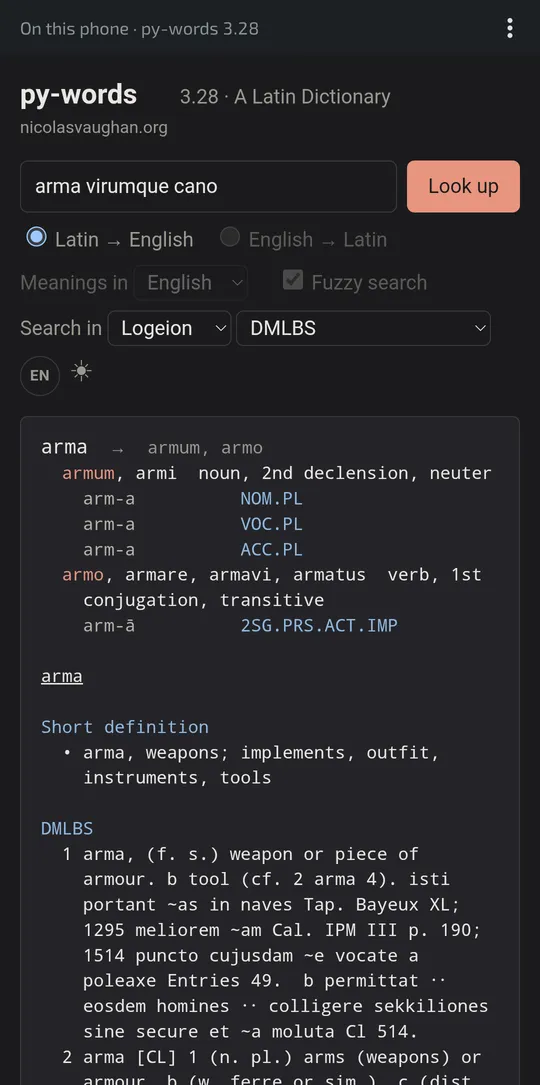
The search also goes the other way, from an English or Spanish word to the Latin. And the window, the terminal, the command line and the web page can show, instead of py-words’ own entries, those of Logeion, the Latin dictionaries of the University of Chicago (Lewis and Short, Gaffiot, Georges, Du Cange, the DMLBS and others). Logeion does not analyse inflected forms, so py-words analyses the word first and asks Logeion for its lemmas.
The programs
All of them share the same dictionary, the same settings and the same history of searches.
The window
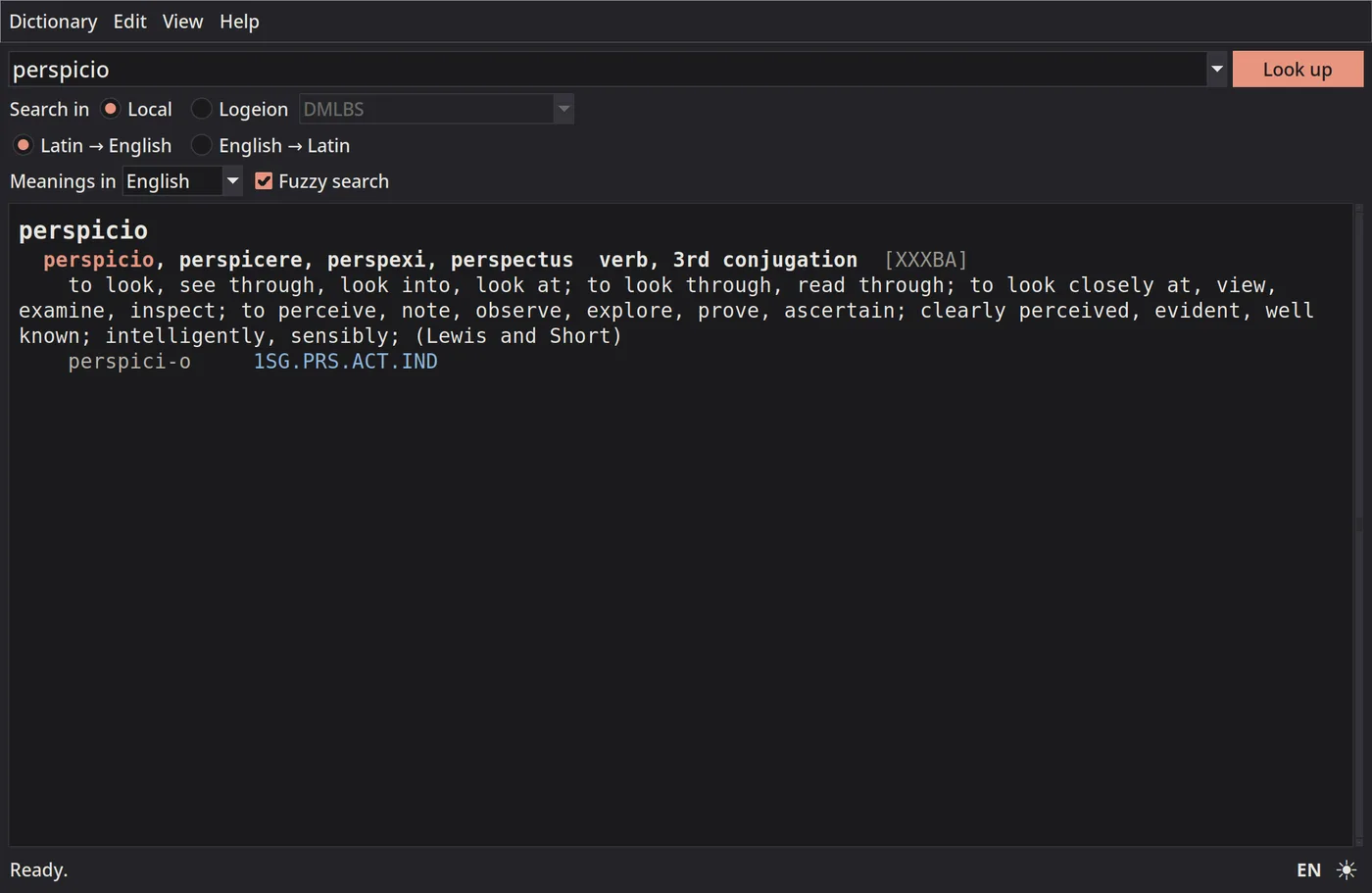
words_gui.py is the usual way to use it: a search box, the direction (Latin to English or Spanish, or back), the language of the meanings, and the results, where a click on the first word of an entry, or a double click on any word, looks it up. It has a dark mode, a help guide, settings, and the two editors of the dictionary.
The command line
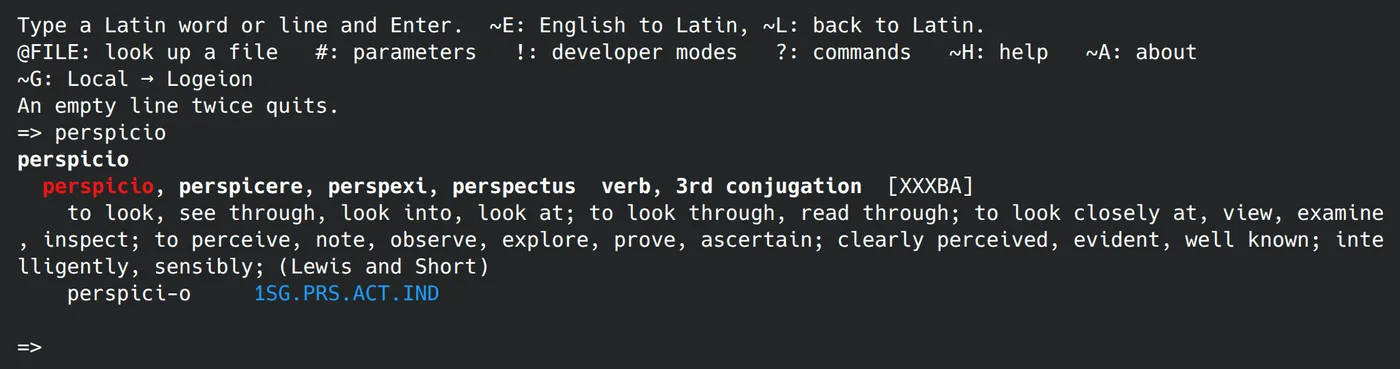
words.py takes the words as arguments (python3 words.py rem acu tetigisti), or reads them one line after another in an interactive session, where commands such as ~E change the direction and ~H shows the help. It also reads files, and its output can be kept in a file.
The terminal, in full screen
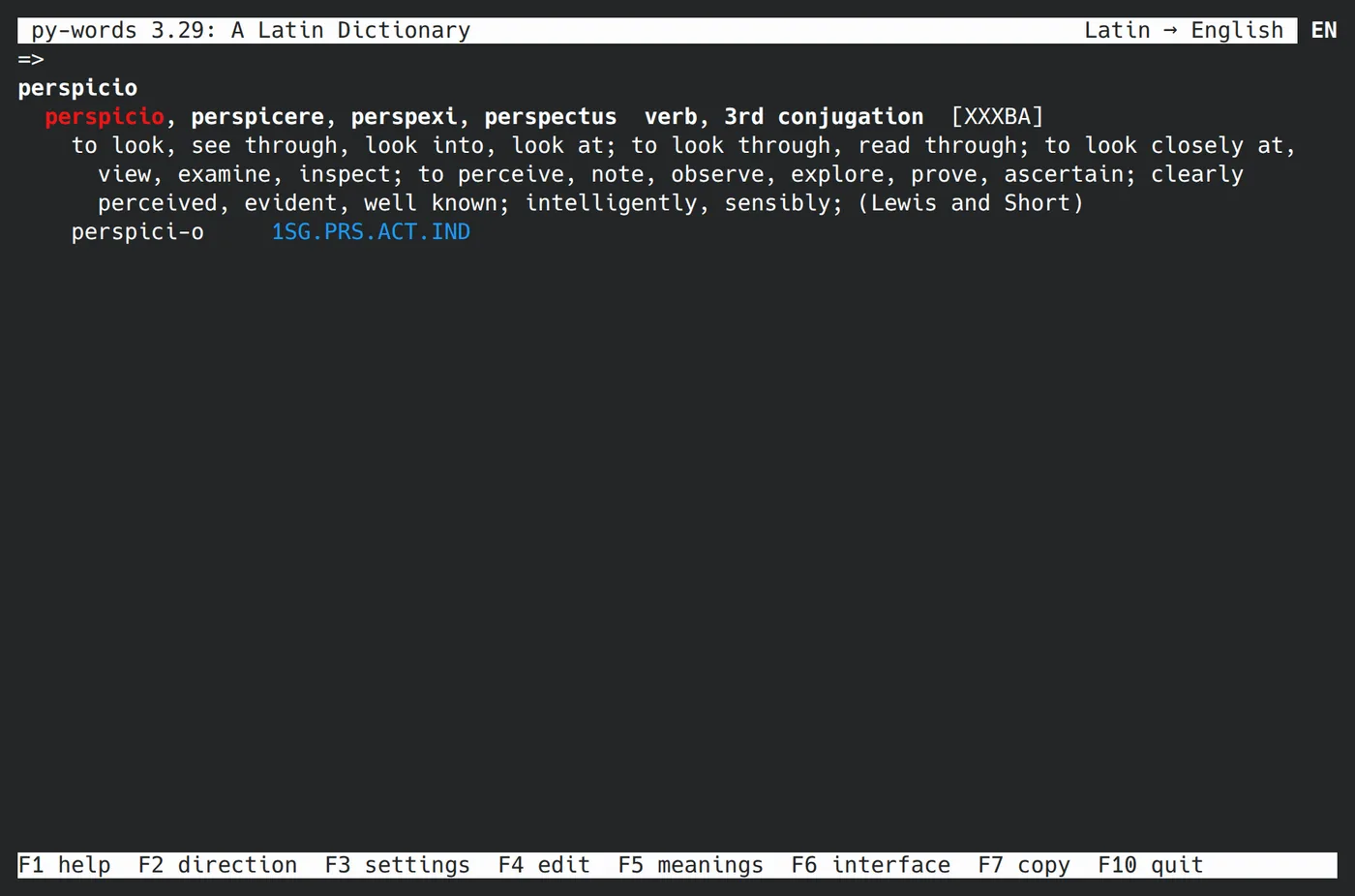
words_tui.py is the window in a terminal: a line for searching, the results below, and the function keys shown on the last line (F2 changes the direction, F5 the language of the meanings, F6 that of the interface, F8 switches to Logeion). It needs nothing but curses, which Python has on Linux and macOS.
The web page
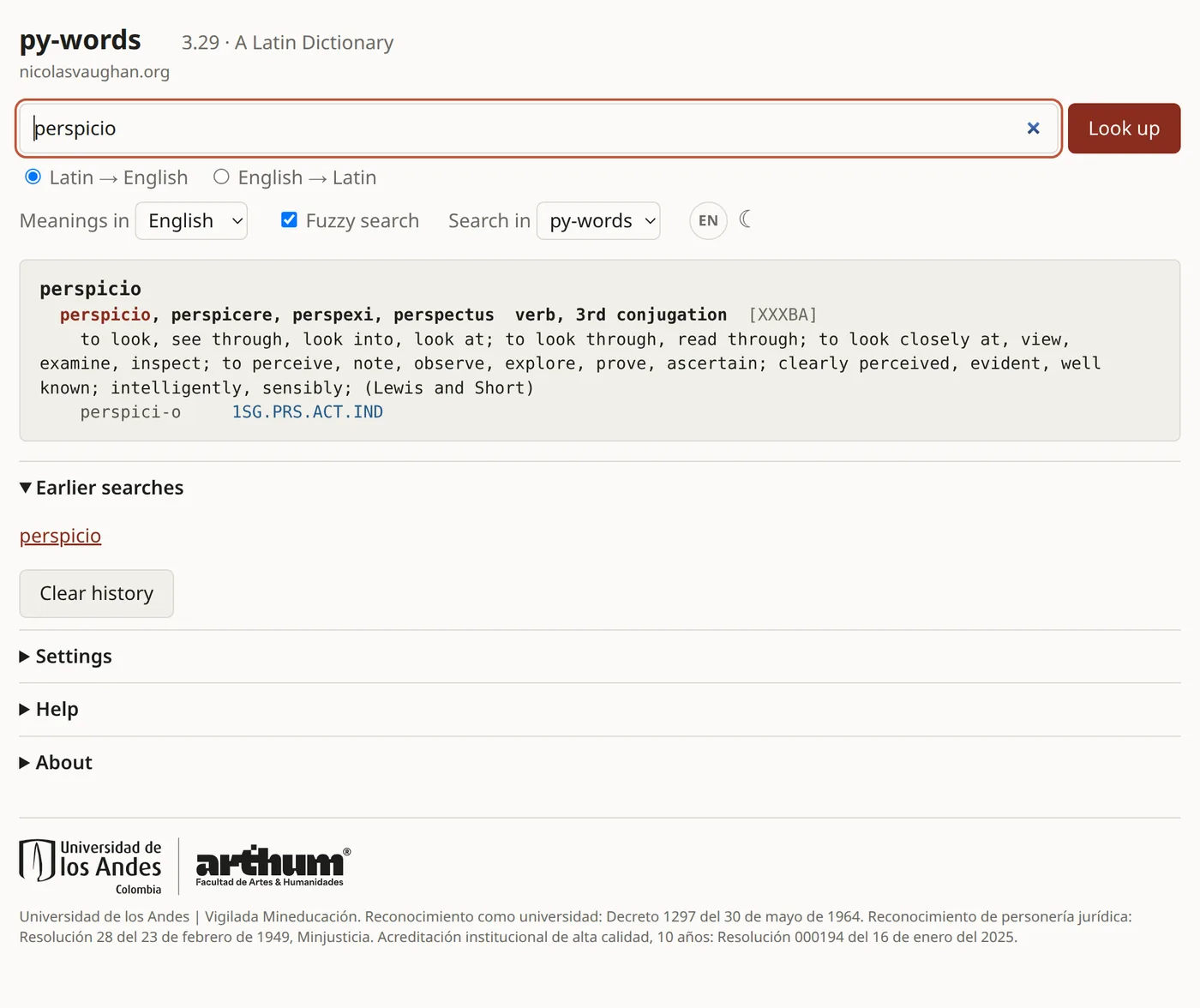
words_web.py starts a small web server on the computer and opens the browser at it. The page has everything the window has, except the editors, and each search has its own address, so it can be bookmarked. The same program, on a public server, is the online dictionary: py-words.uniandes.edu.co, with a mirror at nivaca.pythonanywhere.com. There each visitor has their own settings and earlier searches, kept in the cookies of their browser and never on the server.
In KRunner (KDE Plasma)
krunner-py-words (version 1.1.2) puts the dictionary in KRunner, the launcher of KDE Plasma 6. Type pw and a Latin word, or a whole line, and the entries appear as you type, each with its dictionary form, its meaning and its forms; pw ~e friend goes from English or Spanish to Latin. Enter opens the search in the window of py-words, and other actions copy the results or open the search online. The runner stays in memory with the dictionary loaded, so each query is quick. It follows the settings of py-words, and has a small settings window of its own (pw ?) for the prefix, the languages and the number of results. On Fedora, its package on Copr brings py-words with it.
On Android
py-words for Android (version 2.7) carries py-words itself, with its data and a Python 3.13 to run it, so it works on the phone without the Internet. A menu changes the source to the online site, and back; both show the same page, and changing the source keeps the search on the screen. The first time, the dictionary takes a few seconds to load on the phone, and less afterwards. A word or a line of Latin can be looked up from any app, by selecting it and choosing Look up in py-words, or by sharing the text with the app. The app is written in Kotlin, with Chaquopy to run Python, and needs Android 10 or later on a 64-bit ARM device. It can be installed from its releases (Codeberg, GitHub), with Obtainium, or from my own F-Droid repository, nivaca.codeberg.page/fdroid; all three use the same signed APK, so any one of them updates the others.
Languages
The programs speak English, Spanish or Medieval Latin: their menus, messages, help and settings, the editors and the comments of the configuration file. The language is chosen with a button that shows its code (EN, ES, LA), and the choice is kept for every program. The meanings are in English or in Spanish; with the Latin interface they stay in one of these two. The Spanish meanings come from the Latin-Spanish dictionaries of De Miguel and Echave-Sustaeta wherever they have the word, and the rest were translated from the English. Other languages can be added, one XML file for each.
The dictionary
The dictionary is an XML file of 93,370 entries, with its inflections, irregular forms, affixes and long vowels in files of their own. It comes from these works:
- WORDS, by William Whitaker (1936–2010): the analyses, the inflections and the original entries.
- R. E. Latham, Revised Medieval Latin Word-List from British and Irish Sources (1965): medieval senses, new words and spelling variants.
- J. Echave-Sustaeta, Lengua latina. Vocabulario básico: corrected and added entries, in English and Spanish.
- C. T. Lewis and C. Short, A Latin Dictionary (1879), from the Perseus Digital Library: 6,653 rare words, 1,783 names, and the English definitions of 30,601 entries.
- R. de Miguel and the Marqués de Morante, Nuevo diccionario latino-español etimológico (1867): 25,149 words and names, and most of the Spanish meanings.
- Collatinus, by Yves Ouvrard and Philippe Verkerk: the long vowels of the stems and endings.
Two editors, one in a window and one in the terminal, add, correct and delete entries, and a checker tests the data.
Installing it
Every release is signed, and is on Codeberg and GitHub.
| System | How |
|---|---|
| Windows 10 or later | an installer (.exe), with its own Python |
| macOS 11 or later | an installer (.pkg), for Apple silicon or Intel |
| Linux | an installer (.run), or an AppImage, both with their own Python |
| Fedora | sudo dnf copr enable nivaca/py-words, then sudo dnf install py-words |
| Debian, Ubuntu | a signed .deb package |
| Android | the app, from its releases, Obtainium or F-Droid (see above) |
| Anywhere with Python 3.13 | the zip, or a clone of the repository: python3 words_gui.py |
The installers and the packages add menu entries and a py-words command (py-words opens the window, py-words cli amicus looks up a word). To use it from the source there is nothing to build: the folder is the program.
Documentation
- The user manual, in PDF: English, Spanish, Medieval Latin.
- The README, with everything at length: English, Spanish, Latin.
- How py-words was made, and the changelog.
Versions
The main steps, from the first version to the present one. The changelog has every version.
- 1.0The first public version: WORDS in Python, from its Ada version, with its data in XML.
- 1.4–1.6The analyses written with the abbreviations of the Leipzig Glossing Rules; a settings dialogue; the searches remembered between sessions.
- 1.7, 1.8The full-screen terminal version (
words_tui.py) and the web page (words_web.py). - 2.0, 2.1Meanings in other languages than English, and the whole dictionary and the interface in Spanish.
- 2.2–2.12Dark mode; the dictionary online; a fuzzy search for typos; a help guide in each program; a clearer window.
- 2.13–2.15
Oct. 2026The repository begins. The dictionary compared with Echave-Sustaeta and with Latham's medieval word-list: 44,380 entries. - 3.0
23 Oct.The long vowels, from Collatinus; more medieval spellings; the licence becomes the GNU GPL, version 3 or later. - 3.2
25 Oct.Lewis and Short and De Miguel added: 93,370 entries, with the Spanish meanings rewritten from De Miguel and Echave-Sustaeta. - 3.5–3.10
Nov.An AppImage for Linux; the web page on a public server, with each visitor's settings in cookies; a signed RPM package for Fedora. - 3.17–3.23Logeion as a second source, in every program.
- 3.26–3.29The manual in English, Spanish and Medieval Latin; a
.debpackage; the language of the interface in the main window; installers for Windows, macOS and Linux. - 3.30, 3.31
22–24 Nov.Every file of a release signed, with its checksums; the ways to get the Android app.